CS2 Ping Test
Get your real-time CS2 ping in seconds. The days of checking ping in-game are over.
Looking to lower your ping? We recommend giving this software a try!
WeCoach - The Only CSGO Ping Test You Need
Ever wondered why your shots in CSGO don't land as they should, or why opponents seem to have the upper hand? Enter the CSGO Ping Test, a crucial latency checker for any serious gamer. High ping equals delay; in a fast-paced game like Counter-Strike: Global Offensive, every millisecond counts. That's where WeCoach Ping Test comes into play. It's tailored specifically for CSGO players, offering precise, real-time ping measurements before [starting a CSGO coaching session](https://wecoach.gg/coaches/counter-strike-global-offensive) or game. It isn't just any ping detector; it's your ally in ensuring a smooth, lag-free gaming experience. Whether you're a new player or an aspiring pro, the WeCoach Ping Test is the only ping test you'll ever need.
How to Check CSGO Ping
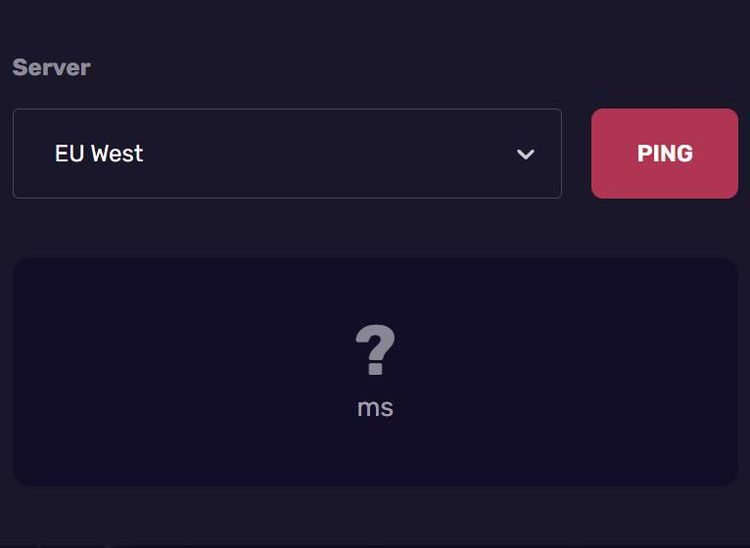
Checking your live ping in CSGO is a breeze with WeCoach ping checker. First, select a server or region; then, click the 'PING' button to get an instant and accurate ping result. It's as simple as that. Our CS:GO ping test tool provides vital insight into your gaming performance without you going into a game, helping you stay ahead of the game.
Does Ping Matter When Playing CSGO
If you're aiming for the top in CSGO, ignoring your ping is like entering a gunfight with a blunt knife. Ping, measured in milliseconds, is the time it takes for your actions to register in the game server. In the heat of a CSGO match, a high ping can mean the difference between victory and defeat. It affects everything - from shooting accuracy to movement fluidity. A low ping, on the other hand, ensures your actions are instantly reflected, giving you a competitive edge.
How To Lower CSGO Ping
Tired of lag affecting your CSGO performance? Lowering your ping might seem daunting, but with WeCoach's tips, it's entirely achievable. Start by connecting to a wired internet connection; stability is key in online gaming. Ensure your router is up to date, and consider a gaming router for optimized performance. Location matters, too - choose a server closest to your current location for the best connection. Remember to close bandwidth-heavy programs and consider upgrading your internet plan if necessary. Regularly use the WeCoach Ping Test to monitor improvements. With these steps, you're lowering your ping and elevating your entire gaming experience.